YOUR NEXT ADVENTURE
A little data.
A world of possibilities.
Find your destination, choose your plan and take Teliny with you.




ONE ACCOUNT · EVERYWHERE
Manage global data and Teliny Credit today, with calls and SMS coming soon.
Helsinki, Finland
GOOD TO SEE YOU
Your services, usage and balance at a glance.
YOUR NEXT ADVENTURE
Find your destination, choose your plan and take Teliny with you.
GLOBAL CONNECTIVITY
Install once, then add destination packages as you travel.
GET CONNECTED
Learn how to install your eSIM with simple, step-by-step instructions for your phone. Open the guide to set up your Teliny eSIM and get ready to connect.
PHONE DATA SETTINGS
Choose your Teliny eSIM for mobile data in your phone settings. We cannot see which line is selected.
QUICK SEARCH
Free trial available in Europe, USA and Canada.
MORE THAN ONE STOP?
One plan for the places on your itinerary.
LATEST
Your purchases and credit movements will appear here.
TRAVEL DATA
First choose where you are going. Then choose Data Packs or Unlimited.
REVIEW YOUR ORDER
Review your plan details, then continue to secure payment.
No automatic renewal. The plan normally starts on first connection unless the final product terms say otherwise.
OPTIONAL TRIP TOOL
Tell us the shape of your journey and we’ll compare country, regional and global plans.
GLOBAL CONNECTIVITY
Install once, then add destination packages as you travel.
Your installed and active eSIM profiles will appear here.
GET CONNECTED
Learn how to install your eSIM with simple, step-by-step instructions for your phone. Open the guide to set up your Teliny eSIM and get ready to connect.
REWARDS & REFUNDS
One simple balance for referral rewards, promotions and refunds.
Eligible credit is applied automatically before your card is charged.
Receive account credit after an invited friend completes an eligible first purchase. The reward and conditions will be shown before you share.
Referral rewards, promotional credit, refunds and redemptions will appear here.
CALLS & SMS
We’re preparing one simple place for international numbers, calls and messages.
Get a virtual number in supported countries, receive SMS and manage calls directly from your Teliny account when the service launches.
HISTORY
Orders, credit and service activity in one timeline.
Your account history will appear when you start using Teliny.
WE’RE HERE TO HELP
Get quick guidance or leave a request for the Teliny team.
When our team is offline, ask the AI assistant or open a ticket. We’ll reply when we’re back. Support hours will be published before launch.
TELINY ASSISTANT
A REQUEST FOR OUR TEAM
Include a little detail so we can help without asking you to start over.
YOUR CONVERSATIONS
See how a request can be assigned a status, answered and resolved. This demo is visible for review only; the real staff inbox will be access-controlled.
READY FOR YOUR TRIP
A few simple settings, then you are ready to connect.
Use your plan’s installation instructions while connected to Wi-Fi. Keep them ready before you leave.
Turn on your Teliny eSIM and select it for mobile data. Enable roaming only if your plan requires it.
Follow your plan’s activation terms and check your remaining data in My eSIMs.
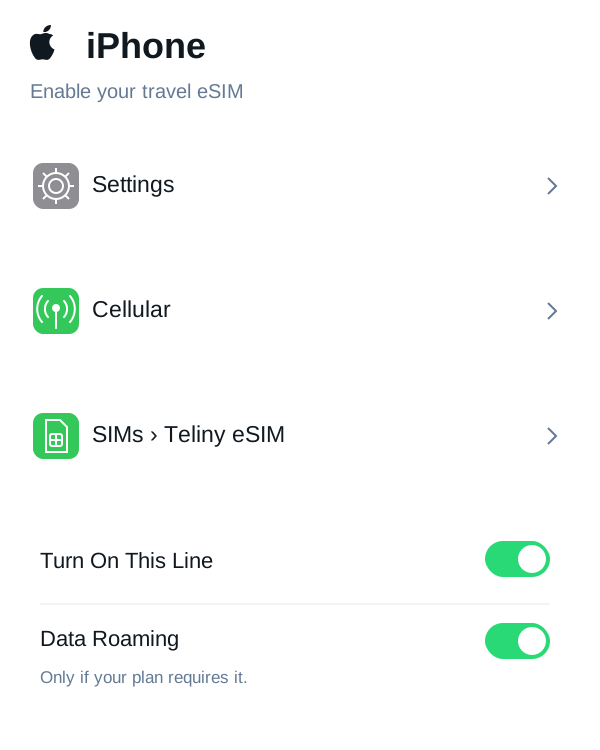
IPHONE
Settings → Cellular or Mobile Service.
Choose your Teliny eSIM and turn on this line. Select it for mobile data.
Enable data roaming only if your Teliny plan requires it. Keep roaming off on your home SIM and review automatic data switching.
Settings names vary by device and software version. These images illustrate the steps; follow your purchased plan’s instructions.
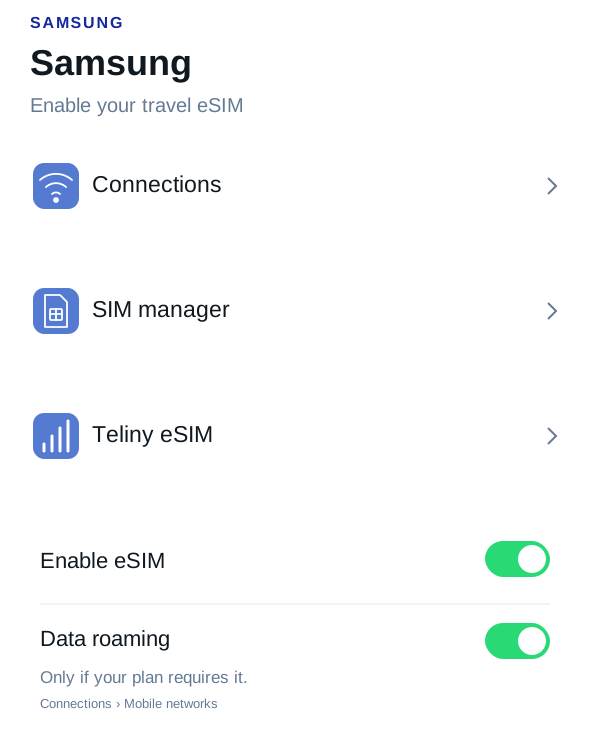
SAMSUNG
Settings → Connections → SIM manager.
Enable your Teliny eSIM and select it for mobile data. Find roaming under Connections → Mobile networks.
Enable data roaming only if your Teliny plan requires it. Keep roaming off on your home SIM and review automatic data switching.
Settings names vary by device and software version. These images illustrate the steps; follow your purchased plan’s instructions.
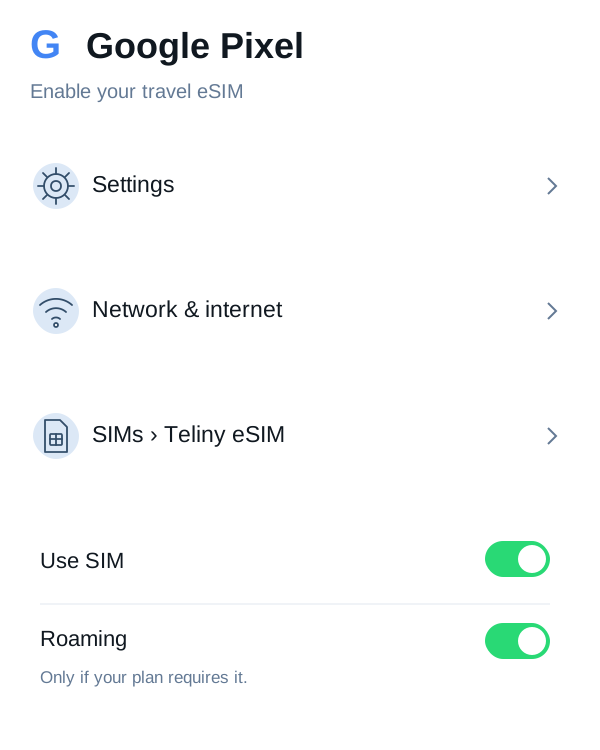
GOOGLE PIXEL
Settings → Network & internet → SIMs.
Select your Teliny eSIM, enable Use SIM, and choose it for mobile data. Roaming is in the SIM settings.
Enable data roaming only if your Teliny plan requires it. Keep roaming off on your home SIM and review automatic data switching.
Settings names vary by device and software version. These images illustrate the steps; follow your purchased plan’s instructions.
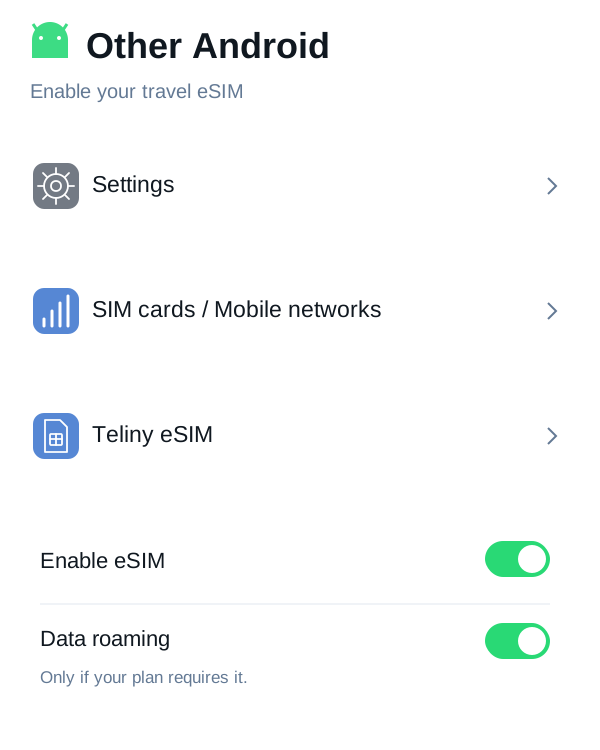
OTHER ANDROID
Settings → Mobile networks or SIM cards.
Choose your travel eSIM and enable it. Menu names vary by manufacturer. Open the selected SIM settings to find roaming.
Enable data roaming only if your Teliny plan requires it. Keep roaming off on your home SIM and review automatic data switching.
Settings names vary by device and software version. These images illustrate the steps; follow your purchased plan’s instructions.
YOUR ACCOUNT
Keep your details and preferences current.